


Complete Explanation of ONU Indicator Light Status
"Analysis of ONU Indicator Light Status"
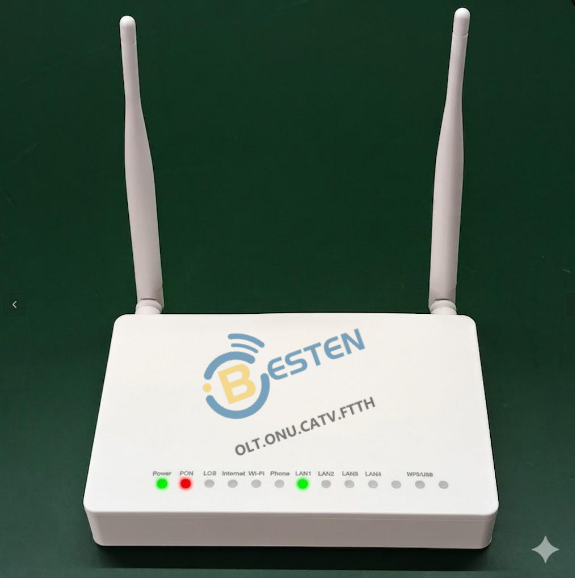
"Meaning of Common ONU Indicator Lights"
1. PON light: PON green light on means 'Registration Successful'
● PON green light steady: indicates registration successful, ONU status can be viewed from Smartolt or U2000 management platform
● "Green light blinking: indicates the ONU is connecting with the OLT device; if it continues blinking for a long time, it may mean the ONU has not passed registration verification, and the registration method needs to be checked for correctness;"
2.Internet light: Internet green light on means 'Can Access the Internet'
● "Internet green light steady: indicates the ONU has obtained an IP from the OLT, the ONU is registered online, and can access the Internet normally;"
3. LOS light: Be careful when the red light is on!
● "Red light blinking: No optical signal, indicates the fiber line is broken or the signal is too weak! Check whether the fiber is bent or the connector is loose; also need to confirm whether the OLT is GPON or EPON network, some ONUs are not XPON and cannot automatically adapt to the OLT network;"
● Light off: Optical fiber connection is normal
4. LAN light: 'Signal light' for the connected ONU
●Green light steady: Network cable connection is normal, the network port connected to the router or computer has no problem.
●Green light blinking: Blinking rhythmically like jumping musical notes, indicates data transmission, the network is in use.
● Light off: Network cable is not properly plugged in or the device on the other end is not powered on, try another cable or port.
5. WiFi light: WiFi turned-on signal light
● WiFi light steady: indicates WiFi is turned on normally, can search the corresponding WiFi through PC or Phone.
● WiFi green light blinking: indicates a device is connected to WiFi and data is being transmitted;
6. Phone light: Voice function light
● Phone steady: indicates the voice function is normally on, can make landline calls normally;
● Phone light off: indicates the voice function is off;
7. WPS light: WiFi connection without password light
● WPS blinking: indicates the ONU's WiFi can be connected without entering a password;
8. USB light: USB port light
● USB light on: indicates the ONU has a USB connected, can be used to back up ONU configuration information or upgrade the ONU;
"Self-check help for other common issues"
1. Power light not on
● Check whether the power plug is loose, and whether the power adapter is normal.
● Hardware damage during ONU transportation.
2.Can connect to Wi-Fi but cannot access the Internet
● First, check whether the PON light is green and the Internet light is green.
● If the PON light is not on, it indicates line abnormality, registration not successful;
● If the PON light is on but the Internet light is not on, check whether an IP has been obtained, it may be IP acquisition failure;
3.LOS blinking
● If LOS blinks after connecting the fiber, check whether the optical power is normal, adjust the optical power to around -21 to -27;
● If LOS still blinks red after connecting fiber and optical power is normal, the ONU may not be able to automatically adapt to the OLT network, or the optical module unit hardware is damaged.
4.PON and LOS lights blinking simultaneously
● If PON and LOS lights blink simultaneously, it indicates ONU hardware damage




Copyright © 2022 Besten telecommunicaition Techology Co., Ltd
All Rights Reserved




+86 18123800301
sales.besten0707@gmail.com